

 A compatible Android-based device
 Authorised playlist or Xtream Codes details
 Credentials kept private and never shared
TiviMate is one of the most popular IPTV player interfaces for Android-based streaming devices, and it is favoured for its television-first layout, remote-friendly navigation and detailed programme guide. It is a viewer only: you supply the authorised service, and TiviMate presents it. The table below summarises what setup involves before the detailed sections walk through the Firestick installation problem, the Companion app, Premium licensing and playback tuning.
| Feature | Purpose | What to check first |
|---|---|---|
| Playlist setup | Organise authorised IPTV channel sources. | Enter the supplied details exactly, preserving the URL prefix and any port number. |
| Electronic programme guide | Improve channel navigation. | Guide data usually arrives after the channel list, so allow extra time before troubleshooting. |
| Premium options | Unlock additional player controls. | Confirm which features your licence tier covers, and that the device can handle them. |
| Buffer configuration | Smooth playback on variable connections. | Change one buffer value at a time and retest the same channel after each change. |
The Firestick Dilemma
Fire TV Stick owners hit the same two obstacles with TiviMate, and both catch people out because neither is obvious from the device itself.
- TiviMate is not published in the Amazon Appstore. Searching the Fire TV home screen will not find it. The app has to be installed through a controlled sideload using a trusted installer, which means temporarily enabling an unknown-app permission and switching it off again afterwards.
- Premium cannot be purchased comfortably on the television. The licence is managed through a linked account rather than bought inside the TV interface, so a Firestick on its own leaves you unable to complete the upgrade. This is what the Companion app exists to solve.
The TiviMate Companion App
TiviMate Companion is a separate application from the same developer, installed on a phone or tablet rather than the television. It handles the account and licence tasks that are awkward with a remote control, then the change appears in TiviMate on the TV once the app is reopened. Install it from the official store listing for your phone, and use the same account on both devices.
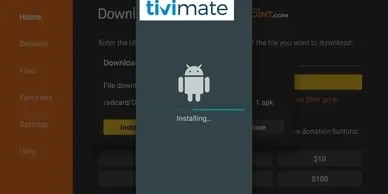
- Prepare the Firestick first. Install pending Fire OS updates and confirm there is free storage. Follow the device preparation steps in the Firestick setup guide, which covers revealing Developer Options safely.
- Enable the installer permission only for the app you are about to use. Grant Install Unknown Apps to the single trusted installer, not to everything.
- Use only a source you trust. Take the package from the developer or your authorised provider. Do not use download codes copied from videos, forums or social posts.
- Install, then close the permission. Delete the downloaded file after a successful installation and switch the unknown-app permission back off.
- Install TiviMate Companion on your phone. Use the official store listing, and sign in with the same account you intend to use on the television.
Unlocking Advanced Features
Premium TiviMate features can improve organisation, guide display options and playback controls. Availability depends on the licensed application version and compatible hardware, so treat the list below as what the tier can offer rather than a guarantee for every device.
Premium licensing and what it unlocks
- Multiple playlists: keep more than one authorised source configured on the same device.
- Recording and catch-up: where your authorised service provides them, and where the device has storage available.
- Custom sorting and favourites: reorder channels and build groups that suit the household.
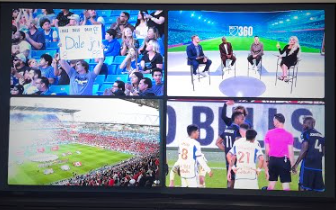
- Multi-View: more than one stream on screen at once, on hardware fast enough to decode them.
- Guide and layout controls: finer control over how the programme guide is displayed.
Multi-View playback
Multi-View places several streams on screen together. It is the most demanding feature in the app: it needs a Premium licence, a device with enough decoding headroom, and a connection that can carry every stream at once. Older Firestick models in particular may stutter with more than two panels.
Current IPTVUK4K Premium Plans for TiviMate
TiviMate needs an authorised service behind it. The plans below are the current published IPTVUK4K options, and any of them supplies the playlist details TiviMate needs. Choose the connection count to match how many screens will watch at the same time.
Published prices are in pounds sterling and match the approved pricing catalogue. Confirm the current amount on the pricing page before checkout. The TiviMate app licence is charged separately by the app developer and is not included below.
| Plan duration | 1 connection | 2 connections | 3 connections | Suited to |
|---|---|---|---|---|
| 1 month | £14.99 | £26.99 | £34.99 | Checking TiviMate compatibility on your device first. |
| 3 months | £24.99 | £44.99 | £64.99 | A flexible quarter-length option. |
| 6 months | £44.99 | £84.99 | £119.99 | A balanced six-month commitment. |
| 12 months | £79.99 | £139.99 | £199.99 | An established setup with Multi-View across screens. |
Troubleshooting TiviMate
Change one variable at a time and note the result after each step, so support can see what has already been ruled out.
- The playlist will not load: re-check the supplied details character by character, keep the URL prefix and port unchanged, and confirm the subscription is active.
- Channels play but the guide is empty: allow more time, then refresh guide data from settings. Guide information usually arrives after the channel list.
- Playback stutters or drops quality: this is a network or device symptom rather than a TiviMate fault. Work through the IPTV buffering guide and change one network variable at a time.
- Multi-View stutters: reduce the number of panels. The device is likely decoding more streams than it can manage.
- Premium features are missing after upgrading: reopen TiviMate on the television so it re-reads the licence, and confirm the Companion app used the same account.
- A single channel fails while others play: the fault is with that stream, not your setup. Test two more before reporting it.
- The app closes unexpectedly: check free storage and restart the device rather than only the app.
Which Devices Suit TiviMate
Installation route and expected performance differ by hardware. Use the guide written for your device alongside this page.
Fire TV Stick
Needs a controlled sideload because the app is not in the Amazon Appstore, plus the Companion app for licence management. Newer 4K models handle Multi-View better than older sticks.
Android TV boxes
Usually the smoothest route, with a store listing on many devices and enough decoding headroom for the heavier Premium features.
Buffering and network faults
Streams that start and then stall are a network question rather than a player question. Diagnose in a fixed order instead of changing app settings repeatedly.
Get Premium IPTV for TiviMate
Choose a plan designed for compatible IPTV players and supported devices, and get the playlist details TiviMate needs.
Frequently Asked Questions
Keep the TiviMate setup controlled and reversible
Install from a source you trust, close the unknown-app permission once the app is on the device, and let the channel list and guide finish loading before changing anything. Use the Companion app on a phone for licence tasks, remember that the app licence and the IPTV subscription are separate purchases, and tune buffer settings one value at a time. Keep every credential private and remove saved details before selling, returning or sharing a device.